Building a Portfolio Optimization App with Streamlit and Python

A Step-by-Step Guide

If you are building a fintech startup, the hardest part is rarely the idea. It is turning that idea into something real before time, money, or momentum runs out.
Most early-stage teams spend months setting up data pipelines, cleaning datasets, and wiring basic infrastructure. By the time a prototype is ready, the original problem you wanted to validate has already shifted. What you really need at this stage is not a perfect system, but a working one that proves your product is useful.
This article is written from that exact perspective. Instead of treating portfolio optimization as a purely academic exercise, I approach it as a product feature that could realistically sit inside a portfolio tracking or investment insights app. The goal is simple: show how a small team can build a usable portfolio optimizer and tracker without overengineering the stack.
Using Python, Streamlit, and market data from EODHD APIs, I walk through how to assemble a minimum viable portfolio tracking service. Not a demo that only works in theory, but a foundation you could actually extend into a real product.
Project Architecture
To create a responsive and interactive portfolio monitoring application, we will leverage Streamlit. Streamlit is a Python library designed for rapid web app development, making it ideal for proof-of-concept projects and early-stage prototypes. Rather than cramming all functionality into a single page, we will take advantage of Streamlit’s multipage feature to structure the app into clear, logical sections.
Here’s an example of how to organize a project:
Project/
  app.py
  pages/
    page_1.py
    page_2.py
    ...
  utils/
    metrics.py
    plots.py
Fetching Data Using the EODHD API
The EODHD APIs offers a straightforward and efficient way to access a wide range of financial data, including historical prices, options data, news, and more. In this article, we will focus specifically on historical prices to calculate optimal portfolio allocations and news data for informed investment insights.
Fetching Historical Stock Prices
The EODHD Historical Prices API offers an easy and straightforward method to access historical stock prices. We will use the following Python functions:
API_KEY = "YOUR_EODHD_API_KEY"

from eodhd import APIClient
import pandas as pd
import requests
from typing import List
import requests

def get_ticker_historical_prices(symbol: str):
    url = f'https://eodhd.com/api/eod/{symbol}?api_token={API_KEY}&fmt=json'
    data = requests.get(url).json()
    data = pd.DataFrame(data)
    data['ticker'] = symbol
    return data

def get_portfolio_historical_prices(symbols: List[str]):
    data = [get_ticker_historical_prices(symbol) for symbol in symbols]
    data = pd.concat(data)
    return data
Fetching Financial News & Events
The EODHD Calendar & News API offers a streamlined method for retrieving recent news events :
def get_ticker_news(ticker):
    url = f'https://eodhd.com/api/news?s={ticker}&offset=0&limit=100&api_token={API_KEY}&fmt=json'
    data = requests.get(url).json()
    data = pd.DataFrame(data)
    return data
News and prices fetching functions will be implemented in a data_fetching.py script inside the utils folder.
Using Streamlit
Streamlit provides comprehensive and clear documentation. Its syntax and philosophy (merged back and front end) allow for rapid implementation, making it ideal for building a first product version quickly, perfect for entrepreneurs or small startups. With one command in the terminal, you can launch your project in your local network and test it.
st.set_page_config(
    page_title="Welcome to Streamlit",
    page_icon="👋",
)

st.sidebar.success("Select a demo above.")
streamlit run app.py

Building the App
When designing the app, it’s important to start with a high-level overview. How many pages do we need? What will be our main features? What is the data we need? How should the user interact with the product? The application will consist of three main pages: one for selecting tickers, one for computing optimal portfolio allocations, and one for monitoring news.
In this example, we aim to give users a way to determine optimal portfolio weights once they have decided which companies to invest in. Additionally, it provides the ability to track recent news for the stocks in their portfolio.
To achieve this, we will create three Python scripts: portfolio_definition.py for selecting tickers, portfolio_optimization.py for computing optimal portfolio weights, and headlines.py for monitoring news headlines. Additionally, we will include a utils folder to organize data fetching functions and other helper utilities.
Project/
  portfolio_definition.py
  pages/
    headlines.py
    portfolio_optimization.py
  utils/
    data_fetching.py
    data_cleaning.py
1. Portfolio Definition
To create a tab that allows the user to specify their tickers of interest, we can use the following implementation:
import streamlit as st
import utils.data_fetching as data_fetching

st.title("Define Your Portfolio")

if "tickers" not in st.session_state:
    st.session_state.tickers = ["AAPL.US", "MSFT.US"]

new_ticker = st.text_input("Add new ticker:")

col1, col2 = st.columns([1, 3])

with col1:
    if st.button("Add"):
        if new_ticker and new_ticker.upper() not in st.session_state.tickers:
            st.session_state.tickers.append(new_ticker.upper())

with col2:
    for t in st.session_state.tickers:
        if st.button(f"Remove {t}", key=f"remove_{t}"):
            st.session_state.tickers.remove(t)
            st.experimental_rerun()

st.write("### Current Tickers")
st.write(st.session_state.tickers)

2. Portfolio Optimization
To create a tab for optimizing a portfolio using the previously selected tickers, the following script is sufficient. It will be the main feature of the product.
Markovitz Parameters
We first define our page title and our sliders for parameter customization. We will allow the user to specify the training set period (for mean-variance optimization) and the test set, as well as the risk-free rate, which is required for optimization. For a more user-friendly interface, we can add captions under the parameters.
import pandas as pd
import numpy as np
import streamlit as st
from datetime import datetime
from utils.data_fetching import get_portfolio_historical_prices
from utils.data_cleaning import clean_dataset
import matplotlib.pyplot as plt
from scipy.optimize import minimize

st.title("Portfolio Optimisation")

# Load portfolio data
df = get_portfolio_historical_prices(st.session_state.tickers)
df = clean_dataset(df)

def sharpe_ratio(returns, risk_free_rate=0.02):
    mean_ret = returns.mean() * 252
    vol = returns.std() * np.sqrt(252)
    return (mean_ret - risk_free_rate) / vol

def portfolio_metrics(weights, mean_returns, cov_matrix, risk_free_rate):
    ret = np.dot(weights, mean_returns)
    vol = np.sqrt(weights.T @ cov_matrix @ weights)
    sharpe = (ret - risk_free_rate) / vol
    return np.array([ret, vol, sharpe])

def neg_sharpe(weights, mean_returns, cov_matrix, risk_free_rate):
    return -portfolio_metrics(weights, mean_returns, cov_matrix, risk_free_rate)[2]

# ----------------------------
# Sidebar / Main Layout Inputs
# ----------------------------
st.header('Markovitz Parameters')
col1, _, col2, _, col3, _ = st.columns([1, 0.1, 1, 0.1, 1, 0.1])

with col1:
    start_date = st.date_input("Start Date", datetime(2013, 1, 1))
    st.caption("Start date used to compute the efficient frontier")
with col2:
    end_date = st.date_input("End Date", datetime.today())
    st.caption("End date used to compute the efficient frontier")
with col3:
    r = st.number_input("Risk-free rate", value=0.02, step=0.001)

Efficient Frontier
Then implement the efficient frontier, with mathematical formulas directly derived from Markowitz’s work.
# ----------------------------
# Filter Data by Date
# ----------------------------
mask = (df['date'] >= pd.to_datetime(start_date)) & (df['date'] <= pd.to_datetime(end_date))
mask_test = (df['date'] >= pd.to_datetime(end_date))
df_filtered = df[mask].copy()
df_test = df[mask_test].copy()

# ----------------------------
# Pivot Data: Date x Ticker
# ----------------------------
returns_df = df_filtered.pivot(index='date', columns='ticker', values='return')

# ----------------------------
# 1. Equal-Weight Portfolio
# ----------------------------
n_assets = len(returns_df.columns)
equal_weights = np.array([1/n_assets] * n_assets)

equal_portfolio_returns = returns_df.dot(equal_weights)
equal_cum_returns = (1 + equal_portfolio_returns).cumprod() - 1

# ----------------------------
# 2. Efficient Frontier / Optimal Portfolio (Max Sharpe)
# ----------------------------
mean_returns = returns_df.mean() * 252  # annualized
cov_matrix = returns_df.cov() * 252     # annualized

constraints = ({'type': 'eq', 'fun': lambda x: np.sum(x) - 1})
bounds = tuple((0, 1) for _ in range(n_assets))
result = minimize(neg_sharpe, equal_weights, args=(mean_returns, cov_matrix, r),
                  method='SLSQP', bounds=bounds, constraints=constraints)

optimal_weights = result.x
optimal_portfolio_returns = returns_df.dot(optimal_weights)
optimal_cum_returns = (1 + optimal_portfolio_returns).cumprod() - 1

# ----------------------------
# Plotting
# ----------------------------

st.write("")
st.header("Optimal Portfolio Performance")

_, col1, _, col2, _ = st.columns([0.1, 1, 0.1, 1, 0.1])

with col1:
    fig, ax = plt.subplots(figsize=(10,6))
    equal_cum_returns.plot(ax=ax, label="Equal Weight Portfolio")
    optimal_cum_returns.plot(ax=ax, label="Efficient Portfolio (Max Sharpe)")
    ax.set_ylabel("Cumulative Returns")
    ax.set_xlabel("Date")
    ax.legend()
    ax.grid(True)
    st.subheader("Train Set")
    st.pyplot(fig)

    cumulative_return = optimal_cum_returns.iloc[-1]
    annual_sharpe = sharpe_ratio(optimal_portfolio_returns, r)

    cola, colb = st.columns([1, 1,])

    with cola:
        st.markdown(f"""
        <div style="text-align:center; font-size:14px; font-weight:bold;">
            Cumulative Return<br>
            <span style="font-size:18px; color:green;">{cumulative_return:.2%}</span>
        </div>
        """, unsafe_allow_html=True)

    with colb:
        st.markdown(f"""
        <div style="text-align:center; font-size:14px; font-weight:bold;">
            Sharpe Ratio<br>
            <span style="font-size:18px; color:blue;">{annual_sharpe:.2f}</span>
        </div>
        """, unsafe_allow_html=True)

with col2:
    if not df_test.empty:
        returns_test_df = df_test.pivot(index='date', columns='ticker', values='return')

        # Make sure test set has the same tickers
        returns_test_df = returns_test_df[returns_df.columns]

        # Compute cumulative returns for optimal portfolio on test set
        optimal_test_returns = returns_test_df.dot(optimal_weights)
        optimal_test_cum_returns = (1 + optimal_test_returns).cumprod() - 1
        equal_weights_cum_returns = ((df_test.groupby('date')['return'].mean() + 1).cumprod() - 1)
        # Plot training vs test set performance
        st.subheader("Test Set")

        fig_test, ax_test = plt.subplots(figsize=(10,6))

        equal_weights_cum_returns.plot(ax=ax_test, label="Equal Weights Portfolio (Test Set)")
        optimal_test_cum_returns.plot(ax=ax_test, label="Optimal Portfolio (Test Set)")
        ax_test.set_ylabel("Cumulative Returns")
        ax_test.set_xlabel("Date")
        ax_test.legend()
        ax_test.grid(True)
        st.pyplot(fig_test)

        cumulative_return = optimal_test_cum_returns.iloc[-1]
        annual_sharpe = sharpe_ratio(optimal_test_returns, r)

        cola, colb = st.columns([1, 1,])

        with cola:
            st.markdown(f"""
            <div style="text-align:center; font-size:14px; font-weight:bold;">
                Cumulative Return<br>
                <span style="font-size:18px; color:green;">{cumulative_return:.2%}</span>
            </div>
            """, unsafe_allow_html=True)

        with colb:
            st.markdown(f"""
            <div style="text-align:center; font-size:14px; font-weight:bold;">
                Sharpe Ratio<br>
                <span style="font-size:18px; color:blue;">{annual_sharpe:.2f}</span>
            </div>
            """, unsafe_allow_html=True)
    else:
        st.info("No test set data available after the selected end date.")

optimal_weights_df = pd.DataFrame({
    "Ticker": returns_df.columns,
    "Weight": np.round(optimal_weights, 4)
})

overweight_threshold = 1 / len(optimal_weights) * 1.1  # 10% above equal weight
underweight_threshold = 1 / len(optimal_weights) * 0.9  # 10% below equal weight

def weight_status(w):
    if w > overweight_threshold:
        return "Overweight"
    elif w < underweight_threshold:
        return "Underweight"
    else:
        return "Neutral"

optimal_weights_df['Status'] = optimal_weights_df['Weight'].apply(weight_status)

def color_status(val):
    if val == "Overweight":
        color = 'green'
    elif val == "Underweight":
        color = 'red'
    else:
        color = 'gray'
    return f'color: {color}'

st.subheader("Optimal Portfolio Composition")
st.dataframe(
    optimal_weights_df.style.applymap(color_status, subset=['Status'])
)
Final Portfolio Optimizer Tab:
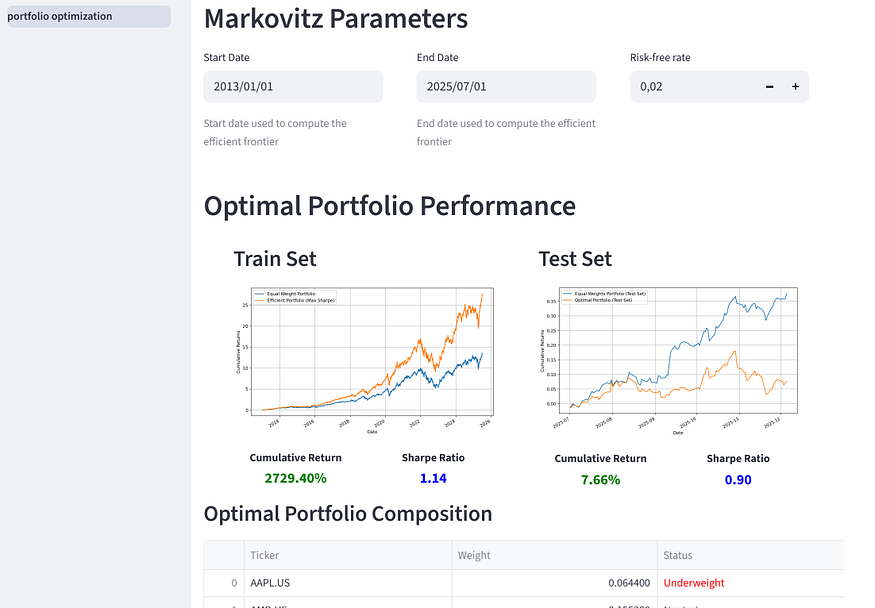
We choose to display the train and test performance of the optimized portfolio and compare it to an equal-weight benchmark. Since the optimization objective is the portfolio Sharpe ratio, we report this metric to the user. Finally, to provide a valuable service, we will display the optimized portfolio weights.
3. Headlines
Finally, here is an example of a news reader for the tickers selected by the user.
Ticker selection
We first import our libraries and configure the titles and interactive section of Streamlit:
import pandas as pd
import numpy as np
import streamlit as st
from datetime import datetime
import json
from utils.data_fetching import get_ticker_news

st.set_page_config(page_title="📰 Recent Headlines", layout="wide")
st.title("📰 Recent Headlines")

# Ensure tickers exist in session_state
if "tickers" not in st.session_state or not st.session_state.tickers:
    st.warning("No tickers found in session state. Please load them first.")
else:
    selected_ticker = st.selectbox(
        "Select a ticker:",
        st.session_state.tickers,
        index=0  # default to first ticker
    )

    st.write(f"Selected ticker: **{selected_ticker}**")

    # Example: Fetch historical data
    with st.spinner(f"Fetching data for {selected_ticker}..."):
        df_news = get_ticker_news(selected_ticker)

Newsreader
We then only need a small script to have a friendly newsreader:
columns = ["timestamp", "title", "content", "link", "tickers", "tags", "sentiment"]
df_news.columns = columns[:len(df_news.columns)]

# Convert timestamps safely
df_news["timestamp"] = pd.to_datetime(df_news["timestamp"], errors="coerce")

# Sort and keep most recent 10
df_news = df_news.sort_values("timestamp", ascending=False).head(10).reset_index(drop=True)

# ---- Styling helper ----
def sentiment_color(value):
    """Return background color for sentiment metrics."""
    if value < 0.05:
        return "#ffcccc"  # red
    elif value < 0.15:
        return "#fff2cc"  # yellow
    else:
        return "#d9ead3"  # green

# ---- Display news ----
for _, row in df_news.iterrows():
    title = str(row["title"]).strip()
    link = row["link"]
    ts = row["timestamp"]
    ts_str = ts.strftime("%Y-%m-%d %H:%M:%S") if pd.notnull(ts) else "Unknown date"
    tags = str(row.get("tags", "N/A"))
    content = str(row.get("content", ""))

    # Parse sentiment safely
    try:
        sent = json.loads(row["sentiment"])
        pos, neu, neg = sent.get("pos", 0), sent.get("neu", 0), sent.get("neg", 0)
    except Exception:
        pos, neu, neg = 0, 0, 0

    # ---- Card layout ----
    with st.container():
        st.markdown(
            f"""
            <div style="background-color:#f9f9f9; border-radius:12px; padding:20px; margin-bottom:20px;
                        box-shadow:0 0 6px rgba(0,0,0,0.1);">
                <h3 style="margin-bottom:6px;">
                    <a href="{link}" target="_blank" style="text-decoration:none; color:#1f77b4;">
                        {title}
                    </a>
                </h3>
                <p style="font-size:0.9em; color:#555;">
                    🕓 {ts_str}
                </p>
            </div>
            """,
            unsafe_allow_html=True
        )

        # Collapsible content
        with st.expander("Read more"):
            st.write(content)

        # Sentiment section
        col1, col2, col3 = st.columns(3)
        col1.markdown(
            f"<div style='background:{sentiment_color(pos)};padding:6px 10px;border-radius:8px;text-align:center;'>😊 Positive: {pos:.2f}</div>",
            unsafe_allow_html=True,
        )
        col2.markdown(
            f"<div style='background:{sentiment_color(neu)};padding:6px 10px;border-radius:8px;text-align:center;'>😐 Neutral: {neu:.2f}</div>",
            unsafe_allow_html=True,
        )
        col3.markdown(
            f"<div style='background:{sentiment_color(neg)};padding:6px 10px;border-radius:8px;text-align:center;'>☹️ Negative: {neg:.2f}</div>",
            unsafe_allow_html=True,
        )

        st.markdown("---")

Here, we display the ten most recent news items for the stock selected by the user. Only their titles are shown initially, with an expandable sidebar allowing the user to view the full content. Since EODHD provides sentiment scores, we include these alongside each article.
Conclusion
This wasn’t written as a “learn Streamlit” tutorial. I’m treating it like a blueprint for a startup MVP.
If you’re planning to build a service around portfolio tracking or portfolio guidance, the fastest path is usually the simplest one. Get the core loop working first. Let users pick tickers. Pull clean price history. Compute allocations. Show performance. Add a news layer so the product feels alive and useful day to day.
That’s exactly what this app does. It gives you a working portfolio optimizer and tracker, with a clean multi-page structure that can be extended into a real product. EODHD APIs handles the part that usually slows teams down early on, which is reliable market data and news. That lets you spend your time on the product layer instead of stitching together messy sources.
If I were taking this forward as a startup, the next upgrades would be simple and product-driven. Add user accounts and saved portfolios. Add constraints like sector caps or max weight per stock. Add alerts for drawdowns, earnings, and major news tags. Then polish the UX and you already have something you can demo to users, or investors, without pretending it’s “just a prototype.”
Further Reading
Modern Portfolio Theory (MPT): To get a more in-depth understanding of MPT, consult Harry Markowitz’s work “Portfolio Selection”.
Streamlit Documentation: To learn how to build quickly interactive tools, explore the official Streamlit documentation.
EODHD Data Access: To find alternative data you can use in your product, consult the EODHD API.


Comments